- JetpackCompose.app Dispatch
- Posts
- JetpackCompose.app's Dispatch: Context #2
JetpackCompose.app's Dispatch: Context #2
💌 In today's Context: Understanding when to use IDE agents vs CLI tools vs background agents — and why you'll probably use all three today

Vinay Gaba
February 07, 2026

🔥 Meet the most powerful AI in Android Studio 🔥
Code 10x faster. Tell Firebender to create full screens, ship features, or fix bugs - and watch it do the work for you. It's been battle tested by the best Android teams at companies like Instacart, Tinder, and Adobe.
GM Friends. This is JetpackCompose.app’s Dispatch: Context, back with another installment on navigating the AI shift. Don’t know what Context is? Read the announcement issue where I gave more “context”.
Today I want to address something I see confusing a lot of engineers: which AI tool should I actually be using?
The answer, as you might suspect, is "it depends." But it's not the cop-out kind of "it depends." There's actually a clear mental model here, and once you internalize it, you'll stop feeling like you're supposed to pick one tool and commit.
The Confusion Is Real (And Understandable)
Here's the thing: the AI tooling landscape is moving so fast that even people who consider themselves "on top of things" feel disoriented.
You've got Firebender, Claude Code, Cursor, Copilot, Aider, Cline, Devin, Factory, Jules, various "background agents"... and every week there's a new contender. Each one claims to be the thing that'll change how you work forever.
So what actually happens? Engineers either:
Pick one tool and try to force it into every situation (square peg, round hole energy)
Get overwhelmed and stick with basic autocomplete (safe, but leaving value on the table)
Bounce between tools randomly without a coherent mental model
None of these are great. Let me offer a different framing.
The Three Modes of AI-Assisted Development
After spending the last couple years obsessing over this stuff (both personally and professionally), I've come to think about AI dev tools in three distinct categories. Not based on the company that makes them, but based on how you interact with them:
1. The Pair Programmer Mode (IDE-Integrated Agents)
Tools: Firebender, Cursor, Copilot, Windsurf, etc.
Mental Model: A senior engineer pair-programming with you in real-time.
Time Allocation: ~30% of your day
This is the category most Android engineers are familiar with. You're in your IDE — Android Studio, IntelliJ, whatever — and the AI is right there with you. You're still driving. Your hands are on the keyboard. You're making decisions in real-time.
When to use it:
You're actively writing code and want acceleration
You need context-aware suggestions that understand your current file and codebase
You're doing iterative work: write a bit, see suggestions, accept/reject, repeat
You want to stay in flow without context-switching
The vibe: You're sitting next to a capable engineer who's watching your screen, anticipating what you need, and occasionally grabbing the keyboard to help out. The collaboration is tight and synchronous. You're both fully present.
For Android specifically, tools like Firebender hyper focus on the Android toolchain, understand Compose well, knows the Android SDK patterns, and works natively in Android Studio. Not all IDE agents are created equal when it comes to platform-specific knowledge.
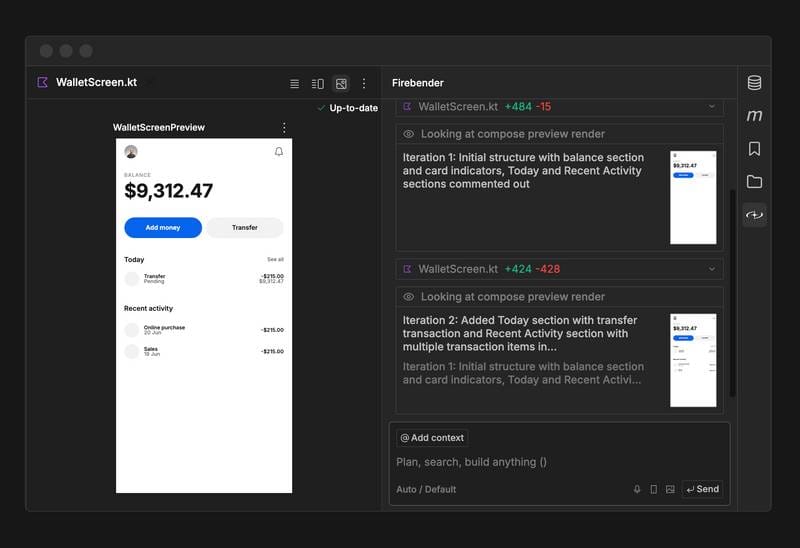
Firebender is especially focused on Android specific workflows like easily generating pixel perfect Compose components
2. The Delegator Mode (CLI/Terminal Agents)
Tools: Claude Code, Aider, Cline, etc.
Mental Model: Handing off a well-defined task to a capable contractor.
Time Allocation: ~30% of your day
This is where you step back from the keyboard and have a conversation. You describe what you want, the agent goes and does it, and you review the result. You're not writing code line-by-line anymore — you're directing work at a higher level.
When to use it:
You have a clear task that spans multiple files
You want to scaffold something new (a feature, a test suite, a migration)
You're refactoring and want the AI to handle the mechanical parts
You want to explore a problem space by iterating on prompts rather than code
The vibe: You're the tech lead. You're giving clear direction, reviewing output, and course-correcting. But you're not in the weeds every second.
Claude Code has become my daily driver for this mode. The ability to have a back-and-forth conversation, let it edit files across the codebase, and then review a coherent changeset is genuinely different from inline autocomplete. It's a different posture entirely.
Here's the key insight: you don't use this instead of your IDE agent. You use it for different kinds of work. When I'm deep in implementation details, making micro-decisions about Compose modifiers or state management, I want Firebender in Android Studio. When I want to say "add instrumentation tests for all the ViewModels in this module" — that's a Claude Code task.

Claude Code has increasingly become my starting point any time I’m doing open ended work or data exploration — which I’ve been doing quite a bit lately.
3. The Fire and Forget Mode (Background Agents)
Tools: Devin, Factory, Codex (OpenAI's agent), various emerging players
Mental Model: Assigning a ticket to a junior engineer and checking back later.
Time Allocation: ~40% of your day
Yes, you read that right. I believe 40% of the tasks most engineers do on a daily basis are straightforward enough that they can be fully delegated to background agents.
Think about it: how much of your work is genuinely novel problem-solving vs. tasks that follow established patterns? Adding a new screen that's similar to existing ones. Writing tests for code that already exists. Migrations that are mechanical but tedious. Documentation updates. Boilerplate.
Background agents work asynchronously. You give them a task, they go off and work on it (sometimes for minutes, sometimes for hours), and they come back with a result. You're not watching. You're not pair-programming. You've fired off the task and moved on.
When to use it:
Tasks that are well-scoped but time-consuming (think: boilerplate, migrations, docs)
Work you'd otherwise put off because it's tedious
Exploring solutions to a problem while you focus on something else
Situations where you want multiple approaches attempted in parallel
The vibe: You're the engineering manager now. You're writing tickets, reviewing PRs, and trusting (but verifying) the output. The constraint isn't your typing speed — it's your ability to clearly specify what you want.
The catch: This only works if you've set things up properly. And by "properly," I mean:
You have a AGENTS.md (or equivalent) in your repo — This is your agent's onboarding doc. It should describe your architecture, conventions, and patterns. Without it, the agent is guessing.
Your best practices are documented — Not in someone's head, not in tribal knowledge, but written down where the agent can read them. Style guides, architectural decisions, testing conventions.
You have a verification loop — This is critical. The agent should be able to run tests, linters, and builds to verify its own work. If it can't check itself, you're just getting code that looks right.
When these pieces are in place, models like Claude Opus 4.6 can zero-shot a surprisingly large percentage of tasks. Not all of them — but enough to fundamentally change how you spend your time.

A vast majority of our tasks tend to be straightforward and I want you to force yourself to use background agents. It requires you to break your frame of reference but its important that you do. There’s no going back once it clicks.
Why You'll Use All Three (Often in the Same Day)

Here's the thing that trips people up: they kick off a background agent, it gets them 60% of the way there, and they're disappointed. "AI isn't ready yet," they say.
But think about that for a second. If I told you in 2019 that a tool would get you 60% of the way through a tedious migration automatically, you'd have called it magic. So why do we suddenly expect 100% perfection?
These modes aren't rigid buckets. They flow into each other. You fire off a background task, it comes back imperfect, you pull it into Delegator mode to iterate, and maybe you finish the last 10% in Pair Programmer mode. That's not failure — that's the workflow working as intended.
Here's what a realistic day actually looks like:
Morning: Fire off background agents for the boring stuff — tests, migrations, KDoc. Go get coffee.
Mid-morning: Open Android Studio with Firebender. Deep work on the gnarly feature — state hoisting, animations, the stuff that needs your brain fully engaged. Pair Programmer mode.
After lunch: Spin up Claude Code. "Scaffold the Notifications module — ViewModel, Repository, Compose screens. Follow the Profile module patterns." Iterate, review, adjust. Delegator mode.
End of day: Review PRs from your morning's background agents. One is 90% good — quick tweaks and merge. The other needs more love — pull it into Pair Programmer mode to finish.
Three modes. Three postures. One day. The mistake is thinking you need to pick a lane.
The Real Unlock
I know what some of you are thinking: "Great, now I need to learn three categories of tools instead of one?"
Yeah. But hear me out.
As these tools mature, the lines between them will blur. Your IDE agent might spawn background tasks. Your CLI tool might offer more real-time collaboration. The specific products will change — but the mental models will persist. Knowing when to specify, when to direct, and when to drive is the durable skill here.
And honestly? The biggest unlock isn't even the tools themselves. It's the setup work that makes Fire and Forget mode possible — writing that AGENTS.md, documenting your conventions, making sure your CI can verify the agent's work. That stuff pays dividends forever because you're not just enabling AI agents; you're creating better onboarding docs for human engineers too.
The engineers who are going to thrive aren't the ones who found one perfect tool. They're the ones who built a toolkit and developed the judgment to reach for the right one.
🤝 The Honor Code
I've been creating content for the Android community for over a decade now. Talks, Articles, Open-source projects like Showkase, this newsletter, JetpackCompose.app, etc I've never charged a penny for any of it.
But here's the deal.
If you've read more than one article that helped you. If you've had more than one "aha" moment from something I wrote or shared. If Dispatch has ever made you smarter at your job or helped you learn about something new.
Then I expect you to share this.
Not asking. Expecting. That's the honor code 🤝
Tweet it. Bluesky it. Send it to your team's Slack. Forward this email to that one Android friend who needs to read this. Whatever works.
👂 Let me hear it!
What did you think of this email? |
On that note, here’s hoping that your bugs are minor and your compilations are error free,
—
 | AI @ Databricks | Google Developer Expert for Android | ex-Airbnb, Snap, Spotify, Deloitte Vinay Gaba is a Google Developer Expert for Android and serves as an Engineering Leader at Databricks. Previously, he was the Tech Lead Manager at Airbnb, where he spearheaded the UI Tooling team. His team's mission is to enhance developer productivity through cutting-edge tools leveraging LLMs and Generative AI. Vinay has deep expertise in LLMs and GenAI, Android, UI Infrastructure, Developer Tooling, Design Systems and Figma Plugins. Prior to these roles, he worked at Snapchat, Spotify, and Deloitte. Vinay holds a Master's degree in Computer Science from Columbia University. |
Reply