- JetpackCompose.app Dispatch
- Posts
- JetpackCompose.app's Dispatch Issue #24
JetpackCompose.app's Dispatch Issue #24
💌 In today’s Dispatch: What I'm up to after Airbnb? 🤖 Sora Android in 28 days ⚡ More useful Compose stack traces 🧩 Bengaluru Meetup 🍻

Vinay Gaba
December 24, 2025

2025 State of Mobile Release Management
Most teams think their release process is “somewhat efficient.” But our data shows 6–10 hours of overhead per release is common — even for teams with heavy automation.
The painful truth: automation isn’t what’s slowing teams. Coordination is.
GM Friends. This is JetpackCompose.app’s Dispatch. The #1 Doctor recommended source for your weekly Android knowledge.
This is Issue #24, and we’re ending the year strong: What I’m doing next?, Compose quality-of-life upgrades, and a few stories worth stealing ideas from before 2026 kicks off.
📣 Personal Update(s)
What am I up to after leaving Airbnb?
A quick personal update, especially for longtime readers: a couple of months ago, I joined Databricks to lead AI Tooling across the company.
I’ve spent a large portion of my career building Android apps (at Airbnb, Snapchat & Spotify), so this isn’t a pivot away from Android — it’s a move toward a problem that applies to every engineer on every platform, Android very much included.
The real question I’m working on is this: how does an engineer’s day actually change in an AI-native world? Not just “what tools do we use,” but how we design, write, review, debug, and ship software when AI is a first-class collaborator.
If AI is going to meaningfully help, it has to reshape the workflow, not just autocomplete lines of code. That’s the problem space I’m in now. And I suspect it’s going to redefine how all of us work over the next few years.
The things I’m learning will apply directly to the work many of you do every day, and I get to help shape them from inside a company sitting at the epicenter of the AI shift 😃 Goes without saying that I’m excited about the work I’m helping shape so I’ll do my best to share more at a regular cadence 🚀
On interviewing
One thing that surprised me was how much interviewing has changed since the last time I did it seriously — almost six years ago. I had a strong run this time around (including offers from some of the top frontier AI labs), and it reinforced something I’ve seen repeatedly: interviewing is far more about preparation than raw ability. Most of us (myself included) underestimate how rusty we are and how much the bar and format have evolved. I’m currently cooking something around this and would consider sharing it more broadly if there’s enough interest — would you be interested in learning more?
Would you be interested in learning more about how to prepare for interviews in today’s market? |
The very first JetpackCompose.app Meetup is happening in Bengaluru
One more personal update: I’m traveling to Bengaluru and using that as an opportunity to host the very first JetpackCompose.app meetup 🎉
The idea is simple — bring together some of the smartest Android engineers in the city for a relaxed evening to hang out, grab a drink, swap stories, and have interesting and transparent conversations about what life on the cutting edge looks like.
This is very hot off the press, so I’m currently looking for a place / company to host and cover the tab. If you have leads or your company would be willing to offer their space to help make this happen, please reach out 🙏 This is purely for the Android community so I’ll be grateful if anyone can help me figure this out.
📍 Bengaluru (exact location TBD)
🗓️ Jan 4th, 2026
⏰ 5–7 PM
If you’re interested in attending, you can sign up here.
Subscribers from Bengaluru — Let’s hang 🤙


Code 10x faster. Tell Firebender to create full screens, ship features, or fix bugs - and watch it do the work for you. It's been battle tested by the best android teams at companies like Tinder, Adobe, and Instacart.
A couple engineers at OpenAI shipped Sora for Android in 28 days (and the advice is surprisingly practical)
OpenAI recently shared how a tiny engineering team shipped a fully production-ready Sora Android app in just 28 days, using AI as a core development partner.
But the real takeaway isn’t the calendar — it’s how they structured the work to make it possible.
Rather than just spitting out code, the team treated Codex (their model/harness of choice, obviously) like a capable senior engineer:
They set norms, conventions, and architectural patterns up front.
They used AGENT.md directives to ensure consistent practices are followed.
AI generated huge swaths of the code, tests, and even suggested improvements — but only after humans defined the rules of the game.
Another thing that stood out for me:
Providing the iOS codebase as an example for converting to Android wasn’t that useful.
Even though the iOS app already existed, Android’s platform differences meant that a naive translation failed fast:
Android APIs and lifecycle patterns don’t match iOS one-to-one.
UI paradigms, threading, navigation, and storage differ significantly.
A lookalike UI still has a very different implementation surface.
So the practical takeaway for Android teams isn’t “just point an LLM at iOS code and wait.” Instead, providing clear plans and context before asking AI to generate or implement code — including asking it to summarize code, understand flows, and then generate based on plans — turned out to be much more effective than ad-hoc prompts.
😆 Dev Delight

Let’s be real — we all know one such engineer!
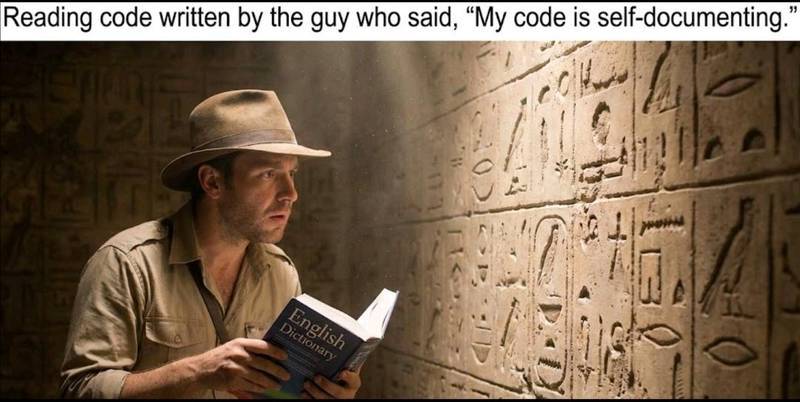
Ya, right 🧐
🤿 Deep Dive
Compose 1.10 stack traces: “Wait… that crash was in my code??”
If you’ve ever gotten a Compose crash stack trace that reads like:
ReusableComposeNode → SubcomposeLayout → ComposerImpl → something something slot table
…and then you just stared into the abyss……Compose 1.10 finally throws us a rope.
Google added an opt-in feature that appends diagnostic Compose stack traces, meaning you can see a reconstructed composable call hierarchy with composable names + source locations (depending on mode). It’s feels like a “nice-to-have” until you hit a crash in production and realize you’ve been debugging with a blindfold.
Why Compose stack traces are weird in the first place
Compose executes your @Composable code across multiple phases—not all of it runs in one linear “function call stack” the way classic imperative UI code does.
Crashes can happen during:
Composition
Side-effect phases:
LaunchedEffect,DisposableEffect(with a few caveats)Coroutines launched via
rememberCoroutineScopeMeasure / layout / draw passes
So the “normal” stack trace you get might be mostly internal runtime frames, because the thing that logically caused the crash might not map neatly to the JVM call stack at the moment the exception was thrown.
The new diagnostic stack trace mode basically says:
“Fine, I’ll reconstruct the composable hierarchy from runtime bookkeeping and attach it as a suppressed exception.”
Enabling it (do this once, early)
Add this in your Application onCreate()—before any compositions get created:
class MyApp : Application() {
  override fun onCreate() {
    super.onCreate()

    // Recommended: enables extra stack traces for
    //minified builds only.
    Composer.setDiagnosticStackTraceMode(
        ComposeStackTraceMode.Auto
    )

    /**
        // Or for local debugging only (heavier):
        Composer.setDiagnosticStackTraceMode(
            ComposeStackTraceMode.SourceInformation
        )
    **/

  }
}
There are 4 modes:
None: no extra infoAuto: recommended; usesGroupKeysin minified builds andNoneotherwiseGroupKeys: intended for minified apps; relies on Compose compiler + R8 mappingSourceInformation: intended for debug; more accurate but expensive
Choosing between Auto, GroupKeys, and SourceInformation
My practical take:
Production: use Auto.
You’re basically saying “only pay for this when it matters (minified builds).”
Debugging a gnarly crash locally: temporarily use SourceInformation.
It’s similar to the overhead of having Layout Inspector attached—aka don’t leave it on casually and then complain Compose is “slow”.
If you’re doing minified internal debug builds: consider GroupKeys.
While there are some gaps, this is a massive debugging quality-of-life upgrade. The difference between “I think it’s somewhere in the UI layer” and “it’s literally this composable, called from this screen” is… several hours of your life.
🥂 Tipsy Tip
Modifier.visible(...): the “View.INVISIBLE” energy we’ve been missing
Compose has historically made you choose between:
“Remove it entirely” (
if (isVisible) { ... }) → affects layout“Keep layout, but hide drawing” → you ended up doing gymnastics with alpha, custom layout, or placeholder composables
Now there’s a new tool in town: Modifier.visible(isVisible).
What it does:
When
isVisible == false, it skips drawing.It still occupies space (like
View.INVISIBLE).It also skips placement (implementation detail), but the key behavior for you: layout space stays reserved.
Example:
Box {
    // Not visible, still takes 50.dp x 50.dp space.
    Box(
        modifier = Modifier
            .size(50.dp)
            .background(Color.Red)
            .visible(false)
    )
}
Note: Don’t use visible(false) as a “perf optimization” to keep a giant UI subtree around. You’ll still pay some costs (especially if you keep state alive and keep measuring). Think of it as a layout semantics tool, not a magic “disable rendering” button.
🦄 How you can help?
If you enjoy reading this newsletter and would like to keep Dispatch free, here’s how you can help:
👉🏻 Chip in via Github Sponsors.
Since it’s the end of the year, a quick note in case this newsletter has helped you keep your Android skills sharp: if your company offers an education or career development budget, you can often use it to support resources like this newsletter.
Newsletters typically qualify as a valid learning expense, and GitHub Sponsors provides an instant receipt for reimbursement. I’ve intentionally kept this newsletter free and accessible, even as many newsletters have moved behind a paywall — and support like this is what makes that sustainable.
If Dispatch has added value for you this year and you have a budget to spare, contributing is a great way to help keep it going ☕️
👂 Let me hear it!
What did you think of this email? |
On that note, here’s hoping that your bugs are minor and your compilations are error free,
—
 | Tech Lead Manager @ Airbnb | Google Developer Expert for Android | ex-Snap, Spotify, Deloitte Vinay Gaba is a Google Developer Expert for Android and serves as a Tech Lead Manager at Airbnb, where he spearheads the UI Tooling team. His team's mission is to enhance developer productivity through cutting-edge tools leveraging LLMs and Generative AI. Vinay has deep expertise in Android, UI Infrastructure, Developer Tooling, Design Systems and Figma Plugins. Prior to Airbnb, he worked at Snapchat, Spotify, and Deloitte. Vinay holds a Master's degree in Computer Science from Columbia University. |
Reply